Results from retailers using Similar AI
These are real outcomes from omnichannel retailers who connected Similar AI to their stores.
10-29x
Return on investment
Typical first-year results
1000s
New pages created
Each matched to customer searches
10 min
Setup time
No developer required
Days
To first results
Not months
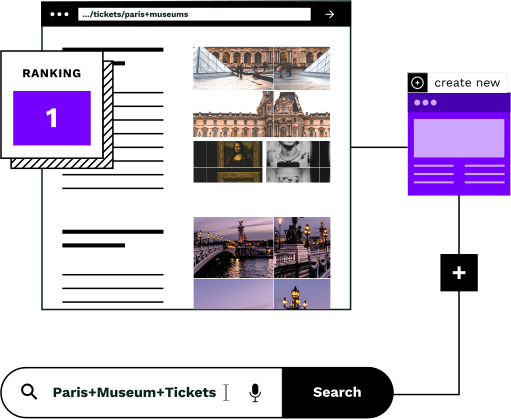
Your customers can't find what you sell
BigCommerce stores typically have categories for main product lines, but miss thousands of specific pages that customers actually search for. Every missing page is revenue going to a competitor.
Customers search, but find nothing
People search for specific product combinations, such as “brass pendant lights under £200”, “waterproof hiking boots size 11”, “organic cotton baby clothes”. If your store doesn't have a page for those terms, they go to a competitor who does.
Creating pages manually takes forever
BigCommerce lets you create category pages one at a time. For a store with thousands of products, building hundreds of missing pages by hand means months of work, and most teams never get past the first dozen.
New pages need content and connections
An empty category page won't attract customers. Each page needs relevant products, helpful content written for the topic, and connections to the rest of your site so customers can discover it.
Connect in 10 minutes. No developer required.
Similar AI's agents connect to BigCommerce's API with a token you create in your store admin. No app store installation, no middleware; your token gives us exactly the permissions we need and nothing more.
Create an API account in BigCommerce
In your BigCommerce admin, go to Settings → API Accounts. Create a new account with read access to Products and write access to Categories. The setup takes about ten minutes.
Share your API credentials
Copy the API credentials (store hash, client ID, access token) and share them securely with our team. This is the only setup step that requires your input; we handle everything from here.
Agents analyze your products and categories
Our agents pull your full product catalog and existing categories through the API. They use this data to understand what you sell, how it's organized, and which pages are missing.
Agents identify pages customers are searching for
By combining your product data with what customers are actually searching for, agents find the pages your site should have but doesn't. Each candidate is validated for relevance and customer interest.
You choose your level of control
Review and approve each page before it goes live, or let agents publish autonomously via the API. Many customers start with review mode, then move to auto-publish as they build confidence.
Agents publish and connect through the native API
Ready-to-publish pages are created as BigCommerce categories through the API, complete with content, product assignments and connections to your existing pages. They appear exactly like any other category page.
Every page is built to convert
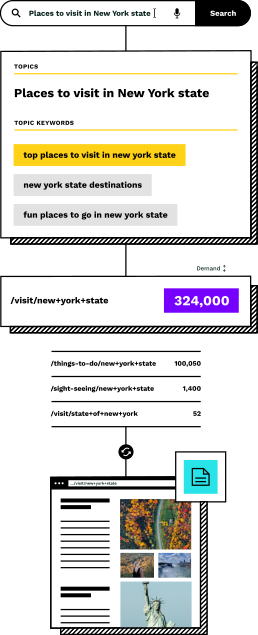
Pages created by our agents aren't empty shells. Each one is built with everything needed to turn visitors into buyers.
The right products on every page
Products are matched by what they actually are, not just tags. A page for "brass pendant lights" only shows products that genuinely match: no false positives, no confused customers.
Content that helps customers buy
Each page gets a unique title, description and category content written from your actual products, in your brand voice, with the information customers need to make a decision.
Connected to your existing pages
New pages are woven into your store with relevant connections: related products, similar categories, complementary collections. Customers can browse naturally from any starting point.
Validated customer interest
Every page created has been checked for real customer interest; people are actually searching for these products. No guesswork, no wasted pages that never attract visitors.
Native BigCommerce categories
Pages are published as real BigCommerce categories through the API. They work with your existing theme, appear in your navigation, and behave exactly like categories you create manually.
Your choice of control
Review and approve every page before it goes live, let agents publish autonomously via the API, or use a hybrid approach. Many customers start with review mode and move to auto-publish as they build confidence.
Manual pages vs Similar AI
Building category pages in BigCommerce admin works for a handful of categories. It doesn't work when you need hundreds.
Creating categories manually
- ×One category at a time through BigCommerce admin: weeks to create dozens
- ×No data on which pages are actually worth creating
- ×Products assigned by rules or manual selection, missing important variations
- ×Content written from scratch for every page, or skipped entirely
- ×New pages are isolated, so customers can't discover them naturally
- ×No way to know if pages compete with your existing categories
With Similar AI's agents on BigCommerce
- Agents identify and publish categories through the API: days, not months
- Every page validated against what customers actually search for
- Products matched by what they are, catching variations rules miss
- Content generated from your actual products in your brand voice
- Pages connected by agents so customers browse naturally across your store
- Agents check that new pages don't compete with existing categories
BigCommerce is where pages live. Our agents build them.
The BigCommerce integration connects your store to Similar AI's agents. Your product feed is analyzed to understand what you sell. Candidate topics are filtered for quality. Approved pages get content that converts and connections that help customers browse.
Your BigCommerce store is where the pages live. Our agents handle everything that happens before they get there, and keep them optimized after.
The result: your BigCommerce store captures revenue that was going to competitors, without your team having to manually research, create, or optimize a single page.
Setup in 10 minutes
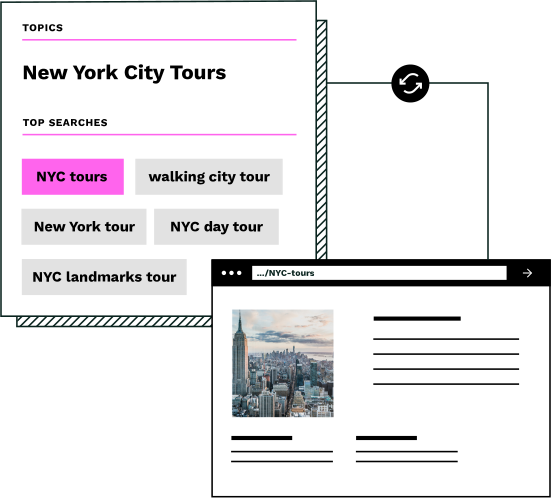
The entire integration setup requires creating an API account in your BigCommerce admin and sharing the credentials. No theme edits, no code changes, no waiting for your developer.
Quick setup guide
- 1Create an API account
In your BigCommerce admin, go to Settings → API Accounts → Create API Account. Give it a name like “Similar AI”.
- 2Configure API scopes
Set the OAuth scopes: Products (Read-only) and Content (Modify). These let us read your products and create category pages.
- 3Save and share the credentials
Click Save and download the credentials file. Share the Access Token, Client ID, and your Store Hash with our team. We handle the rest.
Trusted by

Frequently asked questions
What ROI can I expect from Similar AI on BigCommerce?
Our customers typically see 10-29x ROI in the first year. Your results depend on your product catalog size and how many pages you're currently missing. We can show you specific projections for your store in a demo.
Does this require engineering resources?
No. Setup takes about 10 minutes and only requires creating an API account in your BigCommerce admin and sharing the credentials. There are no theme changes, no code deployments, and no ongoing technical maintenance. Your e-commerce team can handle the entire setup.
How quickly will I see results?
Most customers see new pages attracting visitors within 2-4 weeks of launch. Revenue impact follows shortly after, typically within the first month. The full ramp-up to steady-state performance usually takes 2-3 months as pages mature.
Why do you use the API instead of a BigCommerce app?
App store apps require BigCommerce approval and have limitations on what they can do. Using the API directly lets us publish pages exactly the way you'd create them manually, with full control over content, products, and settings. It also means faster setup: you create an API account, share the credentials, and we're connected.
Will pages look different from my other category pages?
No. Pages are created through BigCommerce's native category system, so they inherit your store's theme and styling. They look and behave exactly like any category page you'd create manually, because technically, that's what they are.
Can I edit the pages after they're published?
Absolutely. Pages created through Similar AI are standard BigCommerce categories. You can edit them in your admin exactly like any other category: change the title, description, product assignments, or settings. We also update content and connections automatically as your catalog changes.
How do agents protect my brand voice?
All content is generated from your actual product data and can be configured to match your brand guidelines. You can set blocked words, tone preferences, and content style rules. Every page goes through your review before publishing, or you can let agents publish directly once you're confident in the quality.
Can agents run autonomously on my BigCommerce store?
Yes. Once configured, agents can operate autonomously, publishing ready-to-publish changes directly via the BigCommerce API. You control the level of autonomy: review mode (approve every change), auto-publish (agents publish directly), or a hybrid where some change types are auto-published and others require review.
See your missing pages in minutes
Enter your BigCommerce store URL and we'll analyze your catalog to identify the pages you're missing: the customer interest behind them, the products that belong on them, and the revenue opportunity they represent.
You'll receive a personalized proposal showing exactly what our agents can do for your BigCommerce store.
Get your free gap analysis
Enter your BigCommerce store URL and work email. We'll identify the category pages your store is missing and send you a personalized proposal.
We'll never share your information with third parties.
Start capturing revenue you're missing
Every day without these pages is revenue going to competitors. See what our agents can do for your BigCommerce store: connect in 10 minutes, no developer required.