Why classification matters for new page decisions
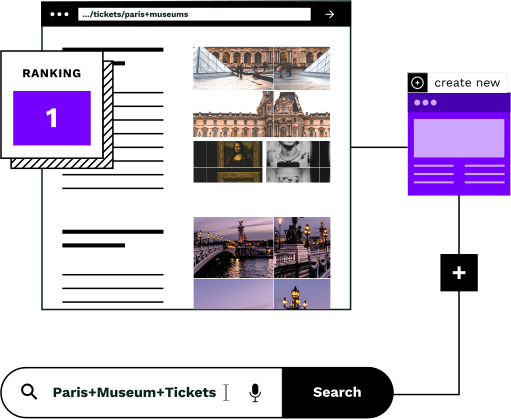
The agent needs to know what type of page already ranks for a topic before deciding whether to create a new one. If a product page ranks for a broad term like “modern chandeliers”, creating a dedicated category page may capture that traffic better, since category pages are often better suited to broad queries.
Decide what to create
If a product page ranks for a broad search term, a dedicated category page may rank higher, since category pages are typically better suited to broad queries. If a blog post already ranks well for a topic, creating a new category page risks cannibalization and might not add value. The page type informs the decision.
Prevent duplication
Before the topic sieve can check for duplicates, we need to know what pages you already have. The agent classifies existing pages by URL pattern to determine whether new pages are needed for a given topic.
Avoid cannibalization
If you already have a category page ranking for a topic, creating another one would compete with yourself. The Similar AI's Topic Sieve checks for existing traffic and rankings as part of its filtering process, detecting overlaps between new and existing pages and helping you avoid creating pages that duplicate existing coverage.
Page types the agent identifies
During setup, you configure URL patterns for page types common to e-commerce and content sites, and the New Pages Agent classifies existing pages accordingly. Each type has distinct characteristics that inform how the agent handles it when creating new pages.
Product pages
Individual product listings with SKU-level detail. These are the bottom of your funnel: specific products people can buy.
Category pages
Collection pages that group products by shared attributes. These capture mid-funnel searchers who know what type of product they want.
Brand pages
Pages dedicated to specific manufacturers or designers. These capture brand-loyal searchers and branded search queries.
Blog posts
Editorial content that addresses questions, trends, or topics related to your products. These build authority and capture informational queries.
Landing pages
Campaign or promotional pages designed for specific traffic sources. Often temporary or seasonal.
Location pages
Pages targeting geographic searches: stores, service areas, or location-modified queries like 'furniture stores in Dallas'.
How classification works
Classification is based on URL patterns. During setup, you provide the URL patterns for your page types, and the agent classifies your existing pages accordingly, then uses this to make smarter decisions about new page creation.
Configure your URL patterns
During setup, you provide the URL patterns for your page types for example, which paths correspond to category pages, product pages, and other page types you configure. The agent classifies your existing pages based on those patterns.
Classify every page
Each URL gets assigned a page type based on its pattern such as product page, category page, and other page types you configure during setup. You can review and correct any classification.
Feed into the Topic Sieve
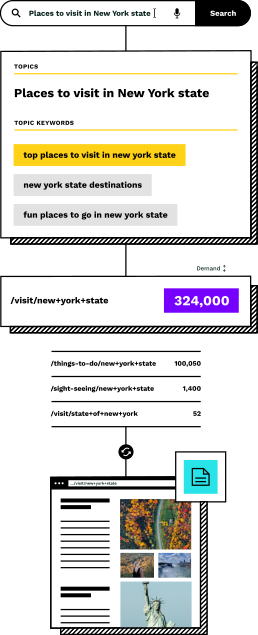
When the Topic Sieve evaluates whether to create a new page for a topic, it runs five checks, including existing traffic and page competition. For example, if a product page ranks for a broad term, that may signal an opportunity for a dedicated category page to perform better.
Inform page creation decisions
The New Pages Agent, through the Topic Sieve, cross-references search demand with the existing product catalog to find missing category page opportunities. The Topic Sieve runs five checks, search demand, product sufficiency, existing traffic, page competition, and product match, to validate whether a new page would fill a genuine gap.
What you get
The New Pages Agent gives you visibility into how it sees your site, so you can verify its understanding.
Page type map
During setup, the agent classifies your existing pages by the URL patterns you provide such as category pages, product pages, and other types you configure to understand what already exists.
Type breakdown
See how many of each page type you have, so you can spot where category coverage is thin.
Creation opportunities
The Topic Sieve identifies genuine opportunities by cross-referencing search demand with your product catalog, running five checks, including search demand, product sufficiency, existing traffic, page competition, and product match, to surface prime for new category pages.
Override controls
Review, adjust, and override any recommendation. You can correct classifications and topic decisions as needed.
The foundation for everything else
The Topic Sieve decides whether a new page is worth creating based on its own filtering process including checks for search demand, product sufficiency, existing traffic, page competition, and product match. Page type classification is a separate capability that helps inform the overall understanding of your site. If a product page already ranks for a topic, the sieve knows a new category page might outperform it. If a category page already exists, there's no point creating a duplicate.
From there, the New Pages Agent creates pages for topics that survive the Topic Sieve's filtering process. The Topic Sieve's multi-check validation including checks for existing rankings and existing traffic helps ensure every new page fills a genuine gap. Avoiding duplication is one of several checks the sieve performs.
URL-based classification is simple by design. It gives the agent the context it needs without overcomplicating the process.
Frequently asked questions
What if a page doesn't fit standard types?
The agent has an 'other' category for pages that don't match standard types, plus the ability to define custom page types specific to your site. If you have a unique page structure (configurators, comparison pages, lookbooks) we can create custom classifications.
How does URL-based classification work?
During setup, you provide the URL patterns for your page types for example, which paths correspond to product pages and which correspond to category pages. The agent then classifies your existing pages based on those patterns. Most e-commerce sites follow recognizable conventions, and you can correct any misclassification.
Can I correct misclassifications?
Yes. You can manually override any classification or topic recommendation. All decisions are transparent, configurable, and reversible.
How does this help with new page creation?
When the Topic Sieve evaluates a topic, it runs five checks, including existing traffic and page competition, to determine whether a new page is warranted. For example, if a product page ranks for a broad term like ‘modern chandeliers’, a dedicated category page may capture that traffic better. If a category page already exists, there's no need to create another one.
Does this work for non-e-commerce sites?
Yes. The agent recognizes common URL patterns for content sites (articles, guides), service sites (service pages, location pages), and hybrid sites. The same principle applies: understand what you have before deciding what to create.
Map your site structure
Book a demo and see how the platform identifies missing category pages by cross-referencing search demand with your product catalog. The Topic Sieve filters genuine opportunities, and the New Pages Agent automatically creates optimized pages to fill those gaps.