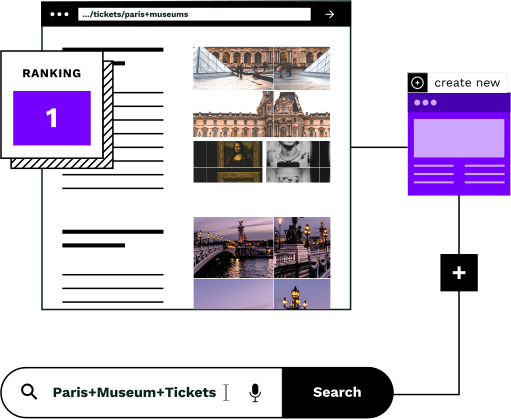
What's the difference between keywords and topics?
Keywords are the exact words and phrases people type into search engines. “Green tea” is a keyword. “Green tea benefits” is another keyword. “Is green tea good for you” is yet another.
Topics are the broader subjects that connect related keywords. The topic “green tea” encompasses all those searches, including “matcha vs green tea,” “best green tea brands,” “green tea caffeine content,” and dozens more.
The shift from keywords to topics isn't just semantic. It changes how search engines evaluate your site (and how much organic traffic you can capture).
Keywords vs topics: a practical example
For an e-commerce site selling home office furniture, here's how the two approaches differ.
Keyword-focused approach
Create separate pages for each keyword:
- •/ergonomic-office-chair
- •/best-ergonomic-chair
- •/ergonomic-chairs-for-back-pain
- •/office-chair-lumbar-support
- •/comfortable-desk-chair
Problem: These pages compete with each other. Search engines see duplicate intent and split visibility between them.
Topic-focused approach
Create comprehensive pages for each topic:
- /ergonomic-office-chairs: covers all ergonomic/comfort-related searches
- /executive-office-chairs: covers style/status-related searches
- /office-chairs-under-500: covers budget-related searches
Result: Each page builds authority for its topic. The site captures more total visibility with fewer, stronger pages.
Why search engines now favor topics over keywords
Google's algorithms have evolved significantly. John Mueller, Google's Search Advocate, has said: “Search engines will get better over time to understand more than just the words on a page.”
Modern search engines evaluate:
- 1Topical authorityDoes your site demonstrate expertise on this subject across multiple pages?
- 2Content depthDoes the page thoroughly address the user's underlying intent?
- 3Semantic relationshipsHow well does your content connect related concepts?
A single comprehensive page on “ergonomic office chairs” can now rank for dozens of related keyword variations (something that wasn't possible in the keyword-matching era).
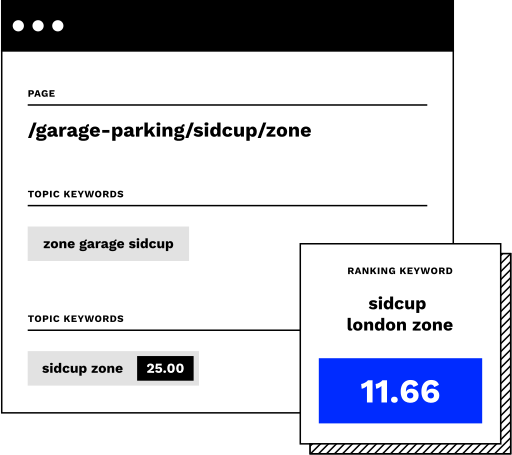
What topic-based organization means for retailers
The shift from keywords to topics changes how you should think about your category structure.
Fewer pages, more visibility
Instead of hundreds of thin pages competing with each other, you build fewer comprehensive pages that each rank for many related searches.
Better user experience
Customers find what they need faster. A well-organized topic page answers multiple questions in one place, reducing bounce rates.
Reduced maintenance
Maintaining 50 strong pages is easier than maintaining 500 weak ones. Updates and improvements compound on pages that already have authority.
Clear site architecture
Topic-based navigation helps customers understand your product range. Categories make sense to humans, not just search engines.
Future-proof content
As AI search tools expand queries into multiple related searches, topic-organized sites capture more visibility from each user question.
Efficient resource allocation
Your team can focus on making pages genuinely helpful instead of creating keyword variations that dilute your efforts.
How to identify topics (not just keywords)
The key is grouping keywords by user intent, not by superficial word similarity.
Look at search results overlap
If two keywords show similar search results, they belong to the same topic. Google has already determined they serve the same intent. Creating separate pages for each wastes effort and creates internal competition.
Group by customer need
Ask: “What is the customer trying to accomplish?” Someone searching “ergonomic chair” and “chair for back pain” wants the same thing: comfort. They belong on the same page.
Consider the purchase journey
Different topics often align with different stages: awareness (“types of office chairs”), consideration (“ergonomic vs executive chair”), and decision (“best ergonomic chair under $500”).
Example: Clustering keywords into topics
Topic: Ergonomic Office Chairs
- • ergonomic office chair
- • best ergonomic chair
- • chairs for back pain
- • office chair lumbar support
- • comfortable desk chair
- • posture correcting chair
Topic: Standing Desks
- • standing desk
- • sit stand desk
- • adjustable height desk
- • electric standing desk
- • standing desk converter
Each topic becomes one comprehensive page that can rank for all related terms.
The challenge: doing this across thousands of pages
For e-commerce sites with thousands of products, identifying and organizing topics manually is impractical.
Thousands of keyword variations
A furniture retailer might have 50,000+ relevant keywords. Grouping them manually takes months.
Constantly changing inventory
Products come and go. Topics that made sense last quarter may not align with current stock.
Search behavior evolves
Customer language changes. New terms emerge. Yesterday's keyword groupings become outdated.
How Similar AI automates topic organization
Similar AI's Topic Sieve automatically clusters keywords into topics based on search result overlap and semantic similarity (the same signals Google uses).
The topic sieve filters these topics against your actual inventory, identifying which ones match products you sell and have genuine customer demand.
Then the page creation system builds comprehensive category pages for each validated topic, complete with unique content, relevant product matches, and internal links to help customers browse.
See this in action
How Visual Comfort uses topic-based pages to drive $2.4M in new revenue
Visual Comfort, a premium lighting retailer, used Similar AI to identify thousands of topic opportunities across their product range. By creating comprehensive, topic-organized category pages, they achieved 29x ROI in the first year.
“The most important benefit is that we were able to deliver seven-figure annual revenue growth with amazing ROI. Using Similar AI pages also saves significant time and allows us to quickly respond to market trends and consumer behavior.”
- Jennifer Skeen, VP of e-commerce, Visual Comfort
$2.4M
New annual revenue
29x
Return on investment
Thousands
Pages created
0
Additional headcount
Frequently asked questions
What is the difference between a single keyword and a cluster of keywords?
A single keyword is one standalone term, while a keyword cluster is a small group of related terms targeting the same intent. Similar AI groups these under unified topics so the Content Agent and Linking Agent capture the full intent cluster rather than optimizing for isolated phrases.
What does targeting a few keywords mean in SEO?
Targeting a few keywords means concentrating your SEO efforts on a small, selective set of high-intent terms rather than pursuing every possible variation. Similar AI's Topic Sieve filters out low-value keyword noise so your efforts focus on topics most likely to convert shoppers into buyers.
Related capabilities
How Similar AI helps e-commerce brands organize around topics.
Ready to organize your site around topics that convert?
See how Similar AI identifies topic opportunities and creates pages that capture organic revenue.