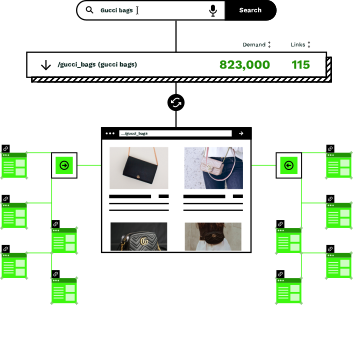
WordPress makes publishing easy; internal linking, not so much
You've built hundreds of pages on WordPress. But connecting them with relevant internal links? That's still a manual process that never gets done properly.

Pages exist in isolation
While WordPress may auto-generate some links through archives or category listings, every new blog post or category page you publish typically lacks intentional, contextually relevant internal links unless someone manually adds them. Without purposeful internal linking, they'll struggle to get the link equity they need to rank.

Manual linking doesn't scale
Adding internal links by hand takes time your content team doesn't have. And even if you do it, the links become outdated the moment you publish something new.

Search engines can't find your best content
Without internal links, Google struggles to discover and understand your site structure. Important pages can get buried while less relevant ones compete for the same traffic.
A WordPress plugin that adds links intelligently
The Similar AI plugin integrates directly with the WordPress Gutenberg editor. Add a block, and it automatically populates with relevant internal links based on your site's content and search behavior.
Install the plugin
Upload the Similar AI plugin through WordPress admin and activate it. The installation is designed to be straightforward, with no theme file modifications needed - just a standard plugin setup.
Add the linking block to your pages
In the Gutenberg editor, add the Similar AI Internal Linking block wherever you want related links to appear. Configure it once, and it works across your entire site.
Links appear automatically
The block connects to Similar AI's linking engine, which uses configurable recipes, crawl data, search query relationships, SERP similarity analysis, and your site structure to determine the optimal pages to link to.
Links update as your site grows
The linking engine dynamically rotates and updates links so that pages don't always show the same destinations, keeping your link structure fresh. Similar AI can also automatically create and link new pages based on search demand, with optional team review before publishing.
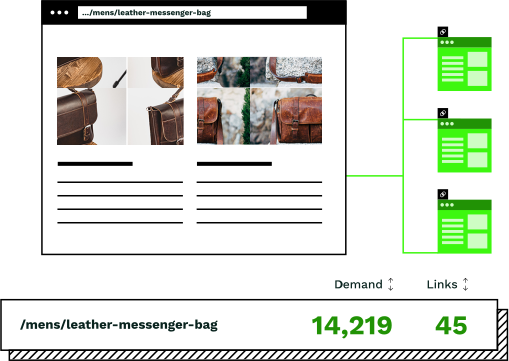
Internal linking that adapts to your content
The integration is powered by Similar AI's Topic Sieve and linking engine, delivering intelligent linking without changing how you build pages.

Topically relevant connections
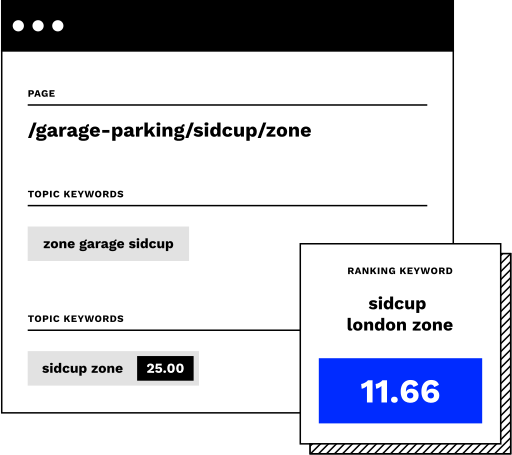
Links are chosen using multiple strategies including semantic relevance, keyword and URL pattern matching, geographic proximity, and search popularity data. The system combines these signals to find the most useful pages to connect to.
Search behavior informs link selection
Links prioritize pages that people are actually searching for. The engine uses search data to surface high-value pages that deserve more internal links.

Works with any WordPress theme
The plugin uses standard Gutenberg blocks that inherit your theme's styling. Links look native to your site because they are; we're just choosing which pages to link to.
Improve crawlability and rankings
Better internal linking helps search engines discover your content faster and understand which pages matter most. More links to important pages means better rankings for those pages.
Managing internal links manually vs with Similar AI
Internal linking is essential for SEO. The question is whether you have time to do it properly.
Without Similar AI
- ×Manually review each page to find relevant linking opportunities
- ×Decide which pages to link to based on intuition or incomplete data
- ×Update existing pages whenever you publish new content
- ×Struggle to maintain consistency as your site grows
- ×Watch important pages lose rankings because they lack internal links
With Similar AI
- Add a block once and internal links appear automatically on every page
- Links are selected based on actual search behavior and content relevance
- New pages get discovered and linked without any manual intervention
- Consistent internal linking strategy across your entire WordPress site
- Important pages get the link equity they need to rank higher
Same linking intelligence, native WordPress experience
The WordPress plugin is powered by Similar AI's internal linking engine. It uses the same algorithms that power our enterprise platform, analyzing content, understanding search behavior, and selecting the most valuable pages to link to.
The difference is in how links are delivered. Rather than requiring development work, links are integrated into existing blocks on your WordPress pages. You control where they show up; we determine which pages to connect.
Production-grade internal linking with zero engineering overhead.
“The ability of Similar AI to quickly adapt ensures our customer experience remains seamless. This has been a standout feature.”
Jennifer Skeen
VP of e-commerce, Visual Comfort
Frequently asked questions
Does the plugin work with any WordPress theme?
Yes. The plugin uses standard Gutenberg blocks that work with any theme. Links inherit your site's existing styles, so they look and feel native to your design. There's no custom CSS or theme modifications required.
What WordPress editors does it support?
The plugin is designed for the Gutenberg block editor. If you use the classic editor or Elementor, we have alternative integration methods using JavaScript that achieve the same result.
How does it decide which pages to link to?
The linking engine uses search behavior signals, intent-driven data, and topical relevance to find the most valuable pages on your site to connect to. It draws on Google Search Console data, SERP similarity analysis, crawl data, and your site's structure to select links that will actually help users and search engines.
Will it slow down my WordPress site?
No. The plugin makes a single API call when the page loads. Link recommendations are delivered quickly, and the block itself is lightweight. Most sites see no perceptible impact on page load times.
Can I control where the links appear on my pages?
Yes. You place the Internal Linking block wherever you want links to show up in your content. Common positions include at the end of articles, in sidebars, or in footer sections. The block is flexible: you decide the placement.
Do I need to update links manually when I publish new content?
No. Links are generated dynamically based on multiple data-driven signals including search data, page authority, revenue metrics, and site structure. When you publish new pages, they become eligible for linking automatically. Existing pages will start linking to new relevant content without any manual intervention.
Start building better internal links on WordPress
Book a demo to see how Similar AI adds intelligent internal linking to your WordPress site, improving SEO, user experience, and organic traffic.