Results from retailers using Similar AI
These are real outcomes from e-commerce businesses and marketplaces that integrated Similar AI's SEO platform.
29x
Return on investment
Cumulative ROI achieved by Visual Comfort since launch
Hundreds+
New pages created
Varies by catalog size, each matched to customer searches
~10 min
Setup time
As stated by Similar AI; no developer typically required
Days
To first results
Not months
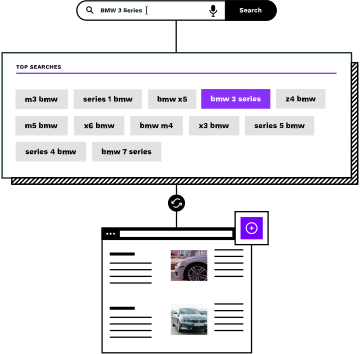
Your customers can't find what you sell
WooCommerce stores typically have categories for main product lines, but often miss many specific pages that customers actually search for especially stores with larger catalogs. Every missing page is revenue going to a competitor.
Customers search, but find nothing
People search for specific product combinations, such as “brass pendant lights”, “waterproof hiking boots men”, “organic cotton baby clothes”. If your store doesn't have a page for those terms, they go to a competitor who does.
Creating pages manually takes forever
WooCommerce lets you create categories one at a time. For a store with thousands of products, building hundreds of missing pages by hand can mean months of work, and most teams struggle to get past the first few dozen.
New pages need content and connections
An empty category page won't attract customers. Each page needs relevant products, helpful content written for the topic, and connections to the rest of your site so customers can discover it.
Connect via the REST API. No plugins required.
Similar AI's agents connect to WooCommerce's built-in REST API using credentials you generate in your store settings. No WordPress plugins to install, no code changes, no added security surface area on your site.
Generate API credentials in WooCommerce
Go to WooCommerce Settings, then Advanced, then REST API. Create a new key with read/write access. This takes about two minutes and uses the API that comes built into every WooCommerce installation.
Share your credentials with our team
Copy your Consumer Key and Consumer Secret and share them securely with us. This is the only setup step that requires your input; we handle everything from here.
Agents analyze your products and categories
Our agents connect to your product feed through the API. They use your product titles, descriptions, and other catalog data to understand what you sell and identify which pages are missing.
Agents identify pages customers are searching for
By combining your product data with what customers are actually searching for, agents find the pages your site should have but doesn't. Each candidate is validated for relevance and customer interest.
You choose your level of control
Review and approve each page before it goes live, or let agents publish autonomously via the API. Many customers start with review mode, then move to auto-publish as they build confidence.
Agents publish and connect through the API
Ready-to-publish pages are delivered via the API, complete with content, product assignments, and internal links connecting them to your existing pages. Each page is built with proper structure and schema markup to work within your store’s site architecture.
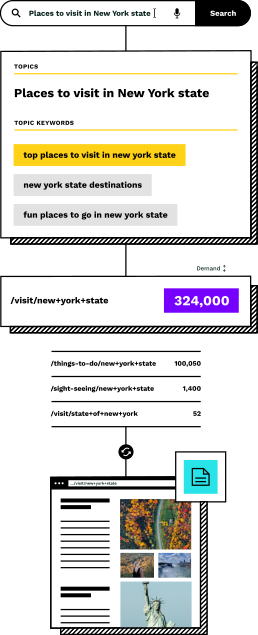
Every page is built to convert
Pages created by our agents aren't empty shells. Each one is built with everything needed to turn visitors into buyers.
The right products on every page
Products are matched based on topical relevance and real search intent. A page for "brass pendant lights" only shows products that genuinely match: no false positives, no confused customers.
Content that helps customers buy
Each page gets a unique title, description and category content written from your actual products, in your brand voice, with the information customers need to make a decision.
Connected to your existing pages
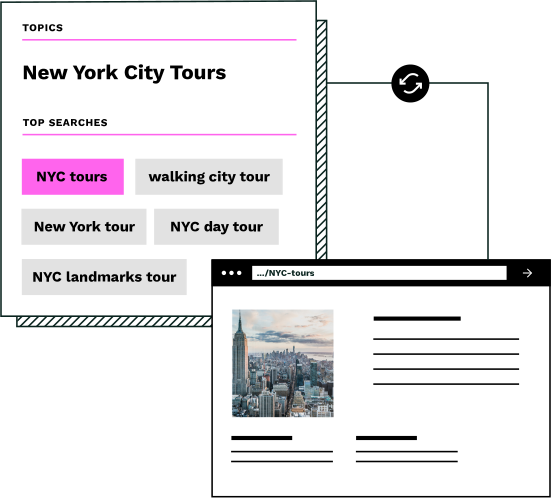
New pages are woven into your store with relevant connections: matched products from your feed and intent-driven internal links to topically related pages. Customers can browse naturally from any starting point.
Validated customer interest
Every page created has been checked for real customer interest; people are actually searching for these products. No guesswork, no wasted pages that never attract visitors.
Native WooCommerce content
Pages are published as real content via Similar AI’s server-side API integration. They are designed to work with your existing theme, appear in your WordPress admin, and typically behave like pages you create manually.
Your choice of control
Review and approve every page before it goes live, let agents publish autonomously via the API, or use a hybrid approach. Many customers start with review mode and move to auto-publish as they build confidence.
Why API integration, not a WordPress plugin?
WordPress plugins can add complexity, security concerns, and maintenance overhead especially as your plugin stack grows. Our API approach keeps your WordPress installation clean while delivering more capabilities.
Typical WordPress plugins
- ×Add code to your WordPress installation that needs updating
- ×Can conflict with your theme or other plugins
- ×Limited by what WordPress can do in real-time
- ×Security surface area increases with each plugin
- ×Heavier plugins can have a performance impact from running on your server
Similar AI's agents via the REST API
- No code installed on your WordPress site
- Typically works independently of your theme and plugins, though platform-specific integrations can also be used
- AI processing happens on our infrastructure, not your server
- Your API credentials are the only touchpoint
- Zero performance impact on your store
WooCommerce is where pages live. Our agents build them.
The WooCommerce integration connects your store to Similar AI's agents. Your product feed is analyzed to understand what you sell. Candidate topics are filtered for quality. Approved pages get content that converts and connections that help customers browse.
Your WooCommerce store is where the pages live. Our agents handle everything that happens before they get there, and keep them optimized after.
The result: your WooCommerce store captures revenue that was going to competitors, without your team having to manually research, create, or optimize a single page.
Setup in 10 minutes
Integration typically requires adding a single line of code to your store. No theme edits, no complex configuration, no waiting for your developer.
Quick setup guide
- 1Generate REST API keys
In your WordPress admin, go to WooCommerce → Settings → Advanced → REST API. Click Add key and set permissions to “Read/Write”.
- 2Copy your credentials
WooCommerce will show you a Consumer Key and Consumer Secret. Copy both (the secret is only shown once).
- 3Share with our team
Send us your Consumer Key, Consumer Secret, and your store URL. We handle the rest. No theme changes, no plugin installations.
Works with your existing WooCommerce setup
Similar AI integrates with any WooCommerce store, regardless of your theme, hosting provider, or plugin stack. We use the standard WooCommerce REST API that comes built into every installation.
Pages are created as native WooCommerce content. They inherit your theme's styling, work with your existing navigation, and appear in your WordPress admin just like any other page.
Whether you're running WooCommerce on shared hosting, a managed WordPress host, or your own servers, our agents work the same way.
Frequently asked questions
Does this require engineering resources?
Setup takes about 10 minutes and typically requires just adding a single line of code to your store. The integration is theme-agnostic and requires no theme changes or code deployments. Category blurbs do not automatically update when your catalog changes, so periodic review is recommended. For standard platforms like Shopify and BigCommerce, your e-commerce team can handle the entire setup, while custom CMS integrations benefit from engineering involvement.
Do I need to install a WordPress plugin?
No. Similar AI connects via the WooCommerce REST API, which is built into WooCommerce. There's nothing to install, update, or maintain on your WordPress site.
Will Similar AI pages work with my WooCommerce theme?
Yes. Pages are created by our agents using the WooCommerce REST API and stored as native WordPress content. They inherit your theme's styling and work with your existing page templates.
What WooCommerce version is required?
Any WooCommerce version with REST API support (3.5 and above). This covers the vast majority of active WooCommerce installations.
How quickly will I see results?
New pages can start attracting visitors within days of launch, and for many customers rankings appear quickly. Initial revenue impact typically follows within weeks. The full impact is usually visible within 60-90 days as pages mature and build authority.
Can agents run autonomously on my WooCommerce store?
Yes. Once configured, agents can operate autonomously, publishing ready-to-publish changes directly via the WooCommerce REST API, though you can also choose a review-before-publish workflow. Customers typically start in review mode (approve every change before publishing) and move to auto-publish as they build confidence. You can also override any agent decision at any time.
Can I edit the pages after they're published?
Absolutely. Pages created through Similar AI are standard WooCommerce content. You can edit them in WordPress admin exactly like any other page: change the title, description, product assignments, or settings. Our agents also keep content and connections optimized as your catalog changes.
Start capturing revenue you're missing
Every day without these pages is revenue going to competitors. See what our agents can do for your WooCommerce store: connect via the REST API in 10 minutes, no plugins required.