Transparency at every step
Most filtering tools give you a pass/fail result and nothing more. Similar AI shows you the exact reason each topic was rejected, the data behind that decision, and the thresholds that triggered it.
Auditable decisions
Every rejection is logged with the check that failed, the threshold applied, and the actual data values. You can audit any decision months after it was made.
Refresh when conditions change
Rejected topics stay rejected, but they aren't deleted. When your catalog changes, demand shifts, or thresholds are adjusted, you or the Similar AI team can refresh the topic list to re-run the sieve with updated parameters.
Manual overrides
See the reasoning and disagree? Move any topic from rejected to approved with a single click. The sieve gives you data; you make the final call.
Six reasons a topic gets rejected
Each rejection reason maps to a specific check in the topic sieve. Understanding these reasons helps you tune thresholds for your business and know when to override.
Low demand
The topic has fewer monthly searches than your configured minimum. If you set the threshold at 50 searches per month and a topic only has 12, it's rejected. The exact volume is shown so you can decide if an override makes sense.
Example:
"brass canopy beds": 8 monthly searches (threshold: 50)
Insufficient products
Too few products match this topic based on your minimum threshold. By default, we reject these because sparse category pages often disappoint customers. However, high-demand rare items (like a sought-after vintage car) may still warrant a page even with minimal inventory.
Example:
"velvet armchairs under $500": 2 matching products (threshold: 5)
Duplicate intent
Another page (either existing or already approved) targets the same search intent. Google treats these queries as equivalent even if the wording differs. Creating both would split your authority.
Example:
"mid century modern sofas" duplicates existing "midcentury sofas" page
Already ranking
An existing page on your site already ranks well for this topic's keywords. Creating a new page would cannibalize the one that's working. The sieve protects your current rankings.
Example:
"leather dining chairs": existing page ranks #4 (threshold: top 20)
Irrelevant products
The products matched to this topic don't genuinely belong. False entity matches (like a brand name mentioned in a description but not actually the product's brand) are caught and filtered.
Example:
"herman miller chairs": matched products only mention Herman Miller in comparison text
Custom rules
Your business-specific rules rejected this topic. You can block brand combinations, exclude seasonal topics outside their window, or create any other custom logic that applies to your catalog.
Example:
"outdoor furniture": blocked during winter months per seasonal rule
Turn rejections into insights
Rejection data isn't just about filtering; it's intelligence about your catalog and market. The patterns in your rejections tell you where to focus.
If most rejections are “insufficient products”, you may have gaps in your product range. If they're “low demand”, your catalog may be more niche than the search data supports. If they're “duplicate intent”, your site already has strong coverage.
The sieve doesn't just tell you what to skip; it shows you why, and helps you decide what to do next.
When to override
The sieve makes data-driven recommendations, but you know your business. Here's when manual overrides make sense.
High-demand rare items
A topic was rejected for 'insufficient products' but demand is significant. A rare vintage sports car might be the only one in your inventory, but if thousands of people search for it, the page still makes sense.
New product line launching
A topic was rejected for 'insufficient products' but you're about to add inventory that will make it viable.
Product pages not yet indexed
Your product pages aren't indexed yet, so you might accept topics with lower demand to start building organic visibility while Google discovers your catalog.
Strategic keyword target
Low current demand, but you know this term will grow or it's critical to your brand positioning.
Seasonal timing
Demand data is low because you're looking off-season. You want the page ready when demand returns.
Deep inventory focus
Your site specializes in having extensive product selection. Even lower-demand categories make sense because comprehensive coverage is part of your value proposition.
Part of the topic sieve pipeline
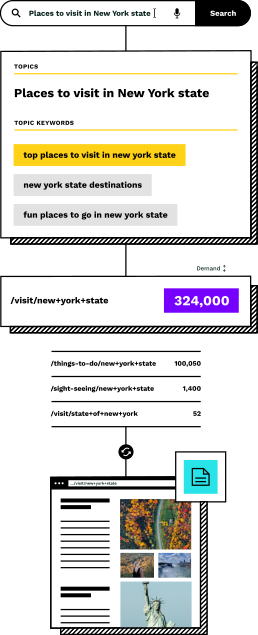
Rejection reasons are the output of the topic sieve. Every topic that doesn't make the cut is tagged with its failure reason, creating a complete audit trail.
The sieve runs after product feed enrichment generates candidate topics, and before page creation builds the approved pages. Rejection data feeds back into your strategy, helping you refine thresholds and identify catalog gaps.
Frequently asked questions
Can I see all rejected topics in one place?
Yes. The Similar AI dashboard shows all topics that passed and all that were rejected, with filtering by rejection reason. You can export this data, review specific topics, and move any topic from rejected to approved.
What happens if I override a rejection?
The topic moves to the approved list and proceeds through page creation like any other approved topic. The override is logged so you can track which pages were created against the sieve's recommendation and compare their performance.
Can rejection thresholds be different for different categories?
Thresholds are set globally, not per category. You configure minimum search demand, minimum product count, and other criteria once, and they apply across all topics. If a specific category needs different treatment, you can use manual overrides for individual topics.
How does 'duplicate intent' detection work?
There are two types of deduplication. First, within each batch of new pages the Content Agent generates, h1 headings are derived from product data, and if two pages end up with the same name they get deduped. Second, if your site already ranks for a keyword, the sieve rejects a new page for that topic to avoid cannibalizing the page that's already working.
Do rejected topics get re-evaluated automatically?
No. Once a topic is rejected, it stays rejected. If your underlying settings change (new thresholds, updated catalog, different demand data), you or the Similar AI team can refresh the topic list, which re-runs the sieve with the new parameters. Topics that now pass under the updated criteria will move to the approved list.
See the sieve in action
Book a demo and we'll run the topic sieve on your catalog. You'll see exactly which topics pass, which get rejected, and why, with full transparency into every decision.